Weight registration
Step by step, from the dashboard to a weighing that is on file. The pictures are from the app itself — this is what you see on the phone.
Works in both regions
The weighing flow is identical in Iceland and Denmark. Sending to Fjárvís (step 7) is Iceland only; the Danish app has no such button, because Denmark has no sheep register to send to.
1 · Open weighing from the dashboard
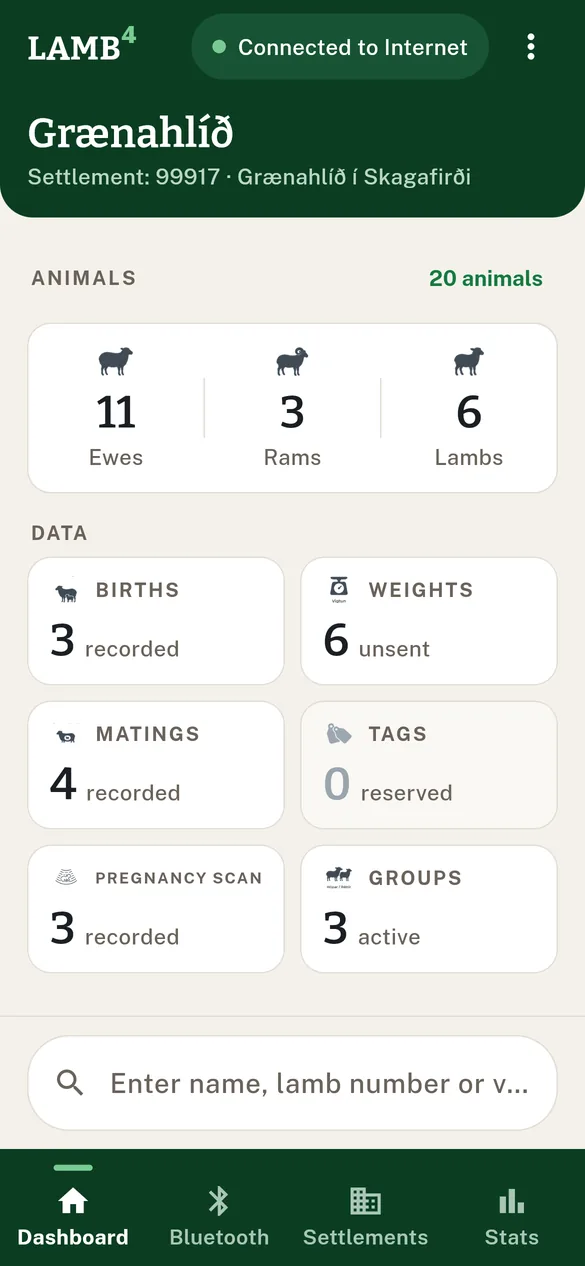
Tap the "Weights" card on the dashboard. The number on the card is how many weighings are waiting to be sent — not the flock's whole weighing history.
The other way in
From an animal's record, that animal's weighing history opens, with a "Weight evolution" chart if there is more than one entry, and buttons to export CSV/Excel or send by email. That is the lookup; the steps below are the registration.
2 · The list of waiting weighings
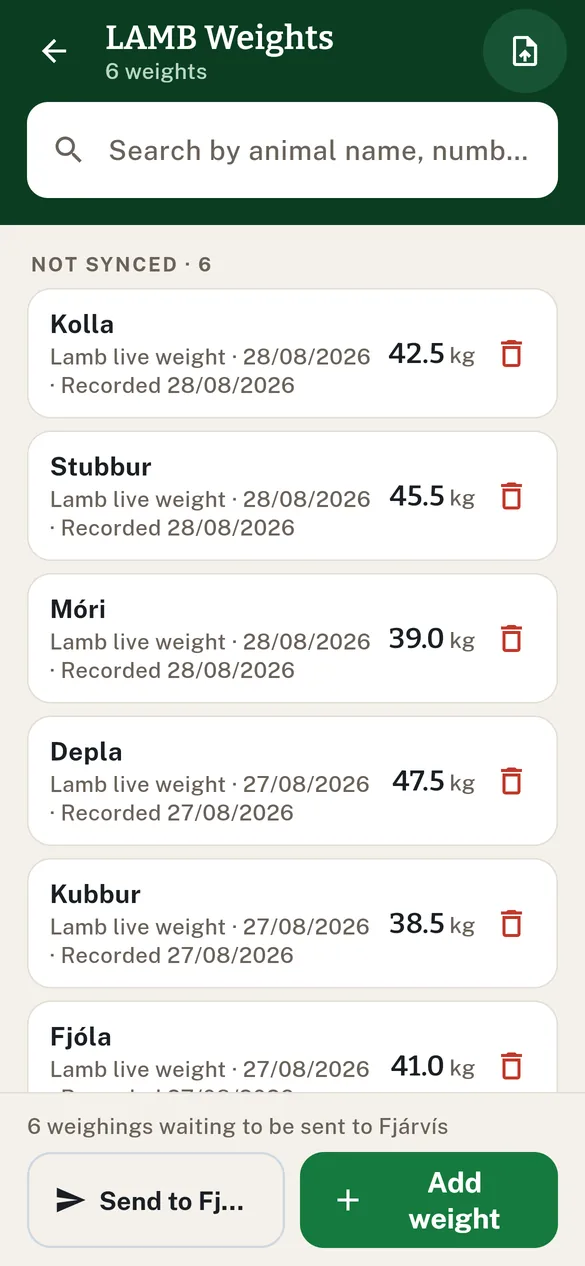
These are the weighings registered in the app and not yet on file with Fjárvís, newest first. Tap "Add weight" to register another.
3 · The registration form
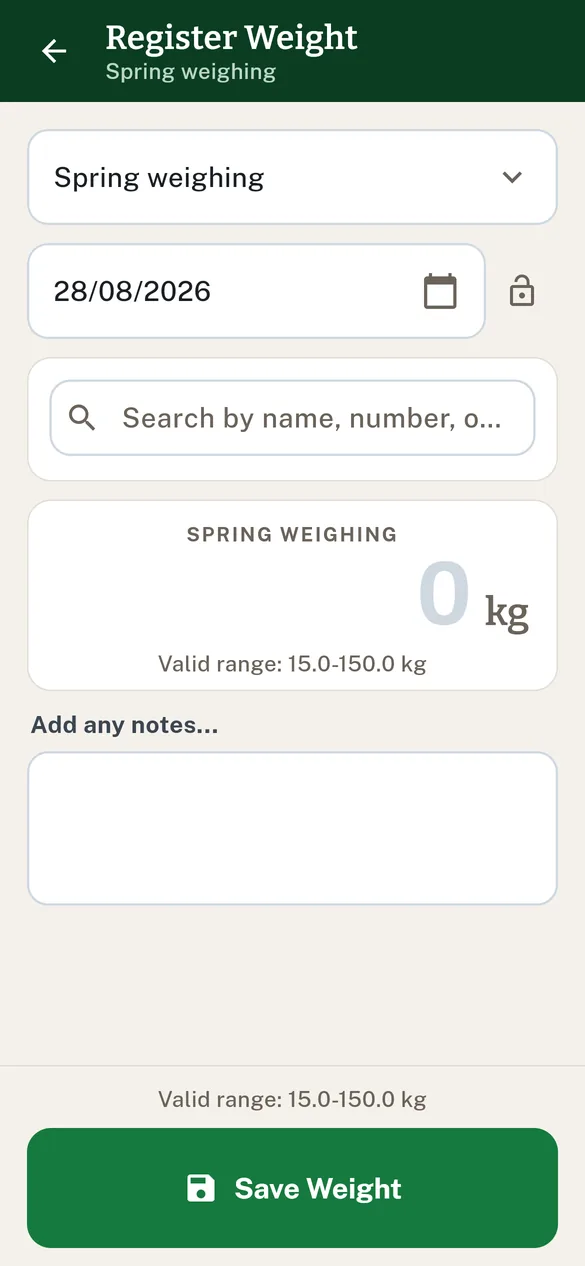
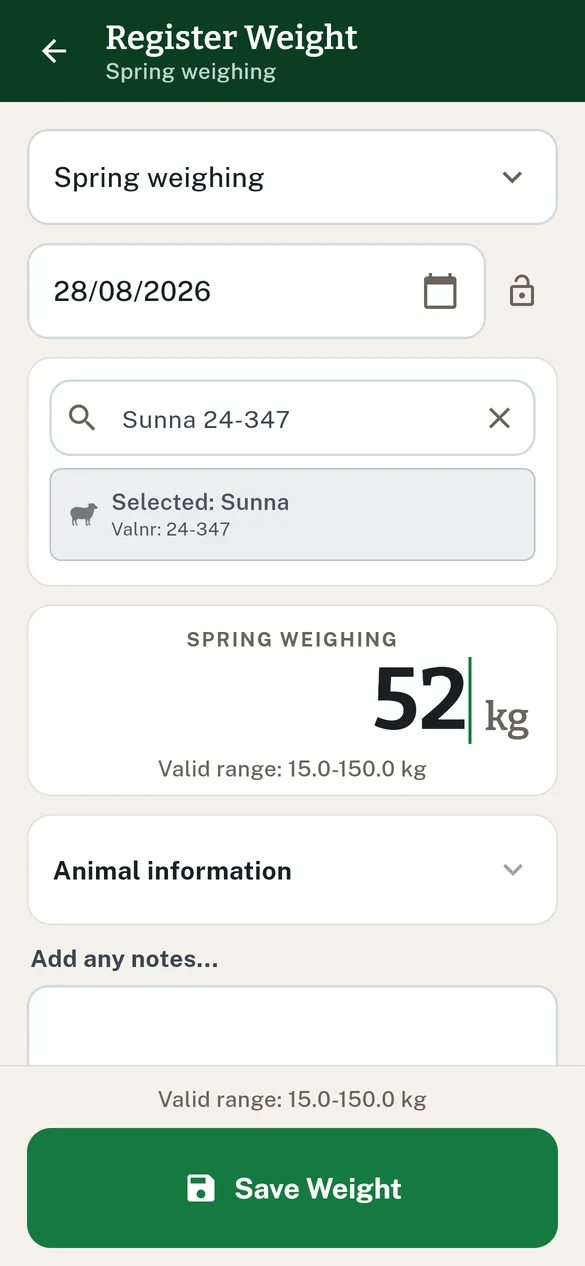
The form opens with the weight type and the date already filled in. The date is today; tap the calendar icon to pick another (you cannot pick a future date, or one before 2020).
4 · Pick the animal
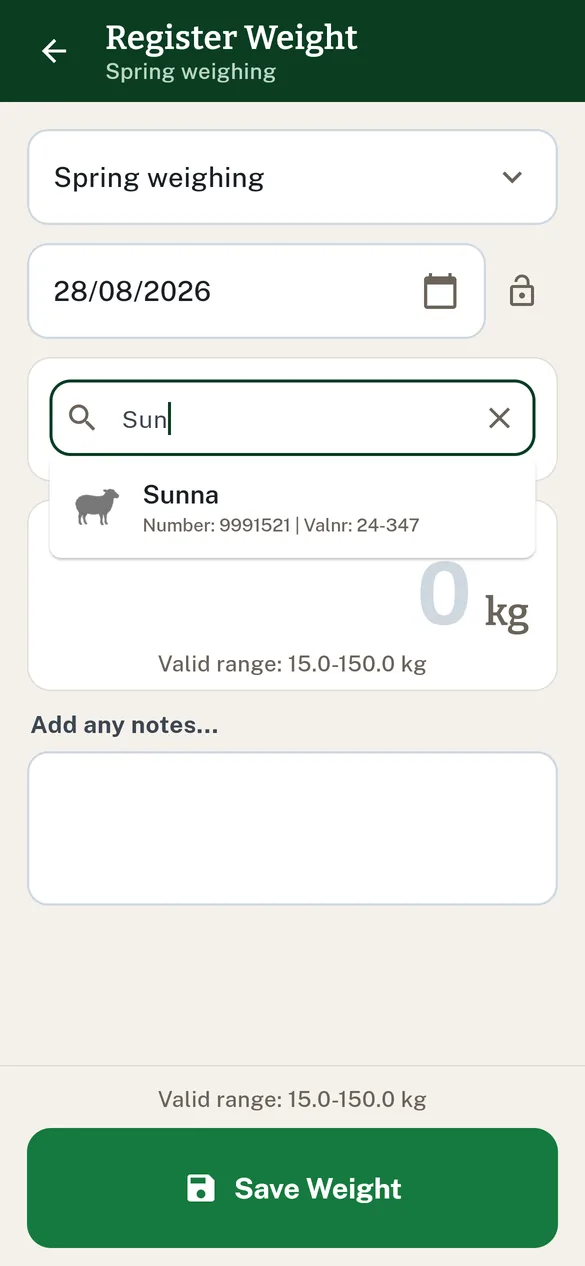
Type a few letters of the name, number or ear tag — a list of suggestions opens under the field. It is a search box, not a full list: on a farm with hundreds of animals, three letters beat scrolling.
With an EID reader
With a reader connected (see Connect an EID reader to the app), a scan picks the animal automatically and suggests the right weight type. If the tag matches no animal you get "No animal found with tag: {tag}."
5 · Enter the weight
The weight is typed on the phone's keyboard. Under the number is "Valid range: {min}-{max} kg" for the chosen type — a number outside that range will not save.
Fjárvís stores whole kilos
For every type except birth weight, the weight is rounded to a whole kilo when it reaches Fjárvís. The app says so under the number as soon as you type a decimal.
6 · Save — and carry on to the next animal
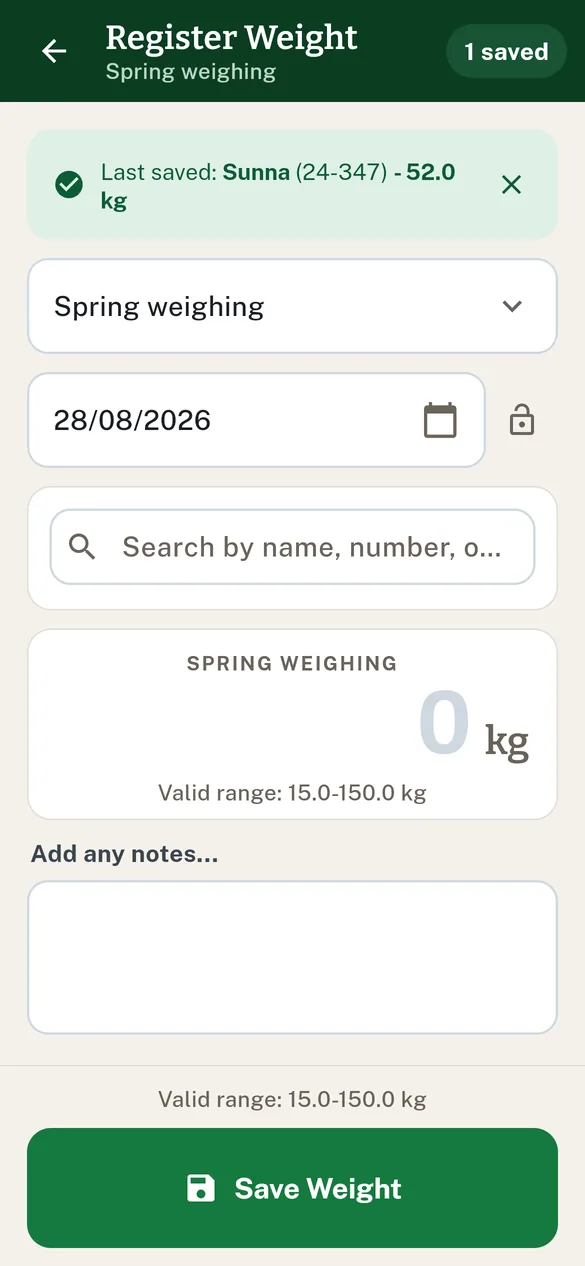
Tap "Save Weight". The screen does not go back: the fields clear, a green strip shows "Last saved: {animal} - {weight} kg", and the counter in the top bar goes up ("1 saved"). Pick or scan the next animal straight away — that is how a whole weighing session runs without going back and forth.
If a weight is already recorded for that day
The dialog "Weight already recorded" appears with the old and the new value side by side. Choose "Replace" and the older entry is deleted and the new one saved instead — two entries for the same animal on the same day are not possible.
7 · Send to Fjárvís (Iceland)
Go back to the list. The weighings you registered are waiting there, and at the bottom it says how many: "{count} weighings waiting to be sent to Fjárvís". Tap "Send to Fjárvís".
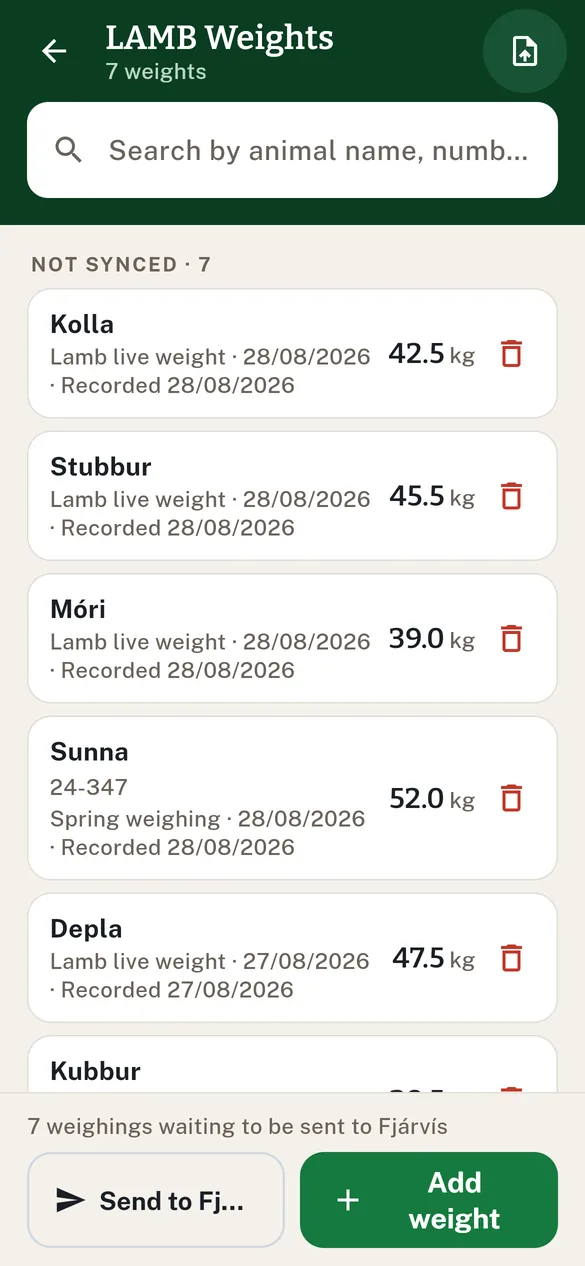
The app sends every waiting weighing for the farm — not just the last one — and then shows a summary: how many went on file, how many were already on file, and which ones Fjárvís refused, with its reason for each.
What can stop a send
- "Fjárvís has not opened production year {year}" — RML opens the year; the weighings wait and go automatically once it does. Nothing to do.
- "{count} weighings have not left the phone yet" — the registrations have not reached the database, so they would not be included. Check the connection and try again.
- "Could not reach Fjárvís" — no connection, not a refusal. Try later.
The first send from a farm that was claimed before its persona was recorded asks for one Fjárvís login. After that the app knows who to credit.
8 · Carcass estimate — should this lamb go now? (Iceland)
When a lamb's autumn live weight is entered, a box under the number shows the estimated carcass weight and how likely it is to land under 13.5 kg — the line below which Icelandic slaughterhouses pay no early-delivery premium at all. Green is safe to send, amber is borderline, red will most likely earn no premium. Nothing to do; it is information, not a condition for saving.
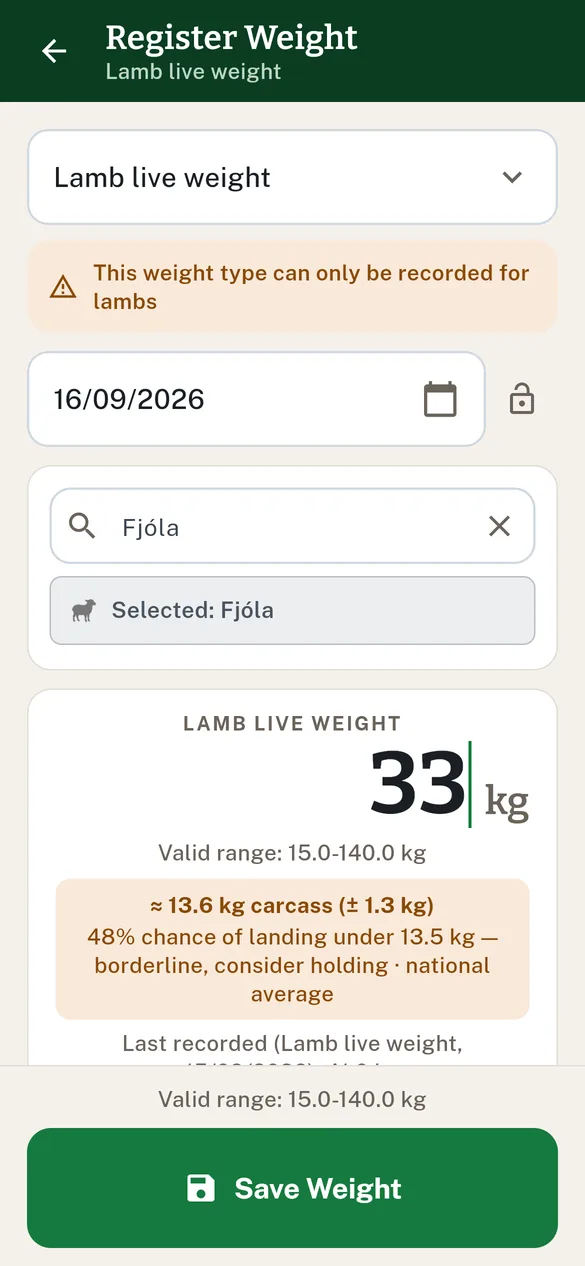
How the number is computed, and what "based on your farm" means, is in Carcass estimate at weighing.
Weight types
| Weight type | Valid range | Restricted to |
|---|---|---|
| Lamb birth weight | 1–10 kg | Lambs |
| Lamb live weight | 15–140 kg | Lambs |
| Autumn weight | 15–150 kg | 1 Sep – 20 Dec |
| Midwinter weighing | 15–150 kg | 21 Dec – 28 Feb |
| Spring weighing | 15–150 kg | Otherwise (Mar–Aug) |
The app picks the type from the animal and the date when the animal is chosen. The two lamb types are locked to lambs: choose one for an adult and you get "Weight type {type} can only be recorded for lambs. Choose a lamb or a different weight type."
Error messages you may meet
| Message | Reason |
|---|---|
| "Weight must be at least {min} kg" | The weight entered is below the minimum |
| "Weight must not exceed {max} kg" | The weight entered is above the maximum |
| "Please select an animal" | Save pressed without choosing an animal |
| "Weight type … can only be recorded for lambs" | A lamb type chosen for an adult |
| "No settlement selected" | No farm is selected on the device |
See also Connect an EID reader to the app and Finding animals.